Top 10 Best Motherboards for PC in 2026
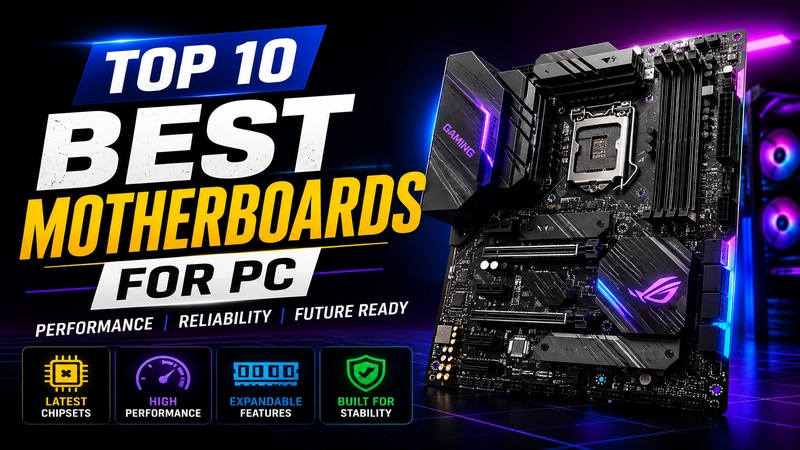
The motherboard is the heart of your PC. It decides which CPU, RAM, and graphics card you can use. Pick the wrong one, and even a costly CPU will not run at its best. In this guide, we share the top 10 motherboards of 2026 for AMD and Intel builds, in simple words, so you can choose the right one for your budget.
Table of Contents
- Quick Answer: Our Top Pick
- How We Picked These Motherboards
- Top 10 Best Motherboards for PC in 2026
- 1. ASUS ROG Crosshair X870E Hero (Best for AMD, Top Choice)
- 2. MSI MAG X870 Tomahawk WiFi (Best Value for AMD)
- 3. GIGABYTE X870 AORUS Elite WiFi7 (Best Mid-Range AMD)
- 4. ASRock B650E PG Riptide WiFi (Best Budget AMD)
- 5. GIGABYTE B650 AORUS Elite AX (Best Overall Mid-Range AMD)
- 6. GIGABYTE Z890 Aorus Master (Best for Intel, Top Choice)
- 7. ASUS ROG Strix Z890-E Gaming WiFi (Best Intel Gaming Board)
- 8. MSI MEG Z890 Unify-X (Best Intel Overall)
- 9. GIGABYTE B760 Gaming X (Best Mid-Range Intel)
- 10. ASUS Prime B760M-R D4 (Best Budget Intel)
- Comparison Table
- How to Choose the Right Motherboard
- Frequently Asked Questions
- Final Thoughts
Quick Answer: Our Top Pick
If you just want one easy answer: for most gamers, a B850 board on AMD or a B760 board on Intel gives almost the same gaming speed as the costly flagship boards. Save your money and spend it on a better graphics card instead.
How We Picked These Motherboards
We looked at four simple things that matter most for daily use and gaming:
- Chipset: This decides what features and upgrade options you get.
- Build quality: Strong power delivery (VRM) keeps your CPU cool and stable.
- Connectivity: USB ports, M.2 slots for fast storage, and Wi-Fi support.
- Price to performance: How much you get for the money you spend.
Top 10 Best Motherboards for PC in 2026
1. ASUS ROG Crosshair X870E Hero (Best for AMD, Top Choice)
This is a top-end board for people who want the best of everything. It supports the latest AMD Ryzen CPUs, has fast DDR5 memory support, and comes with five M.2 slots for lightning-fast storage. It costs more, but it is built to last many years without needing an upgrade.
2. MSI MAG X870 Tomahawk WiFi (Best Value for AMD)
If you want strong performance without paying flagship prices, this is the board to get. It has a solid power design, built-in Wi-Fi, and four M.2 slots. Most reviewers agree this board gives the best mix of price and performance on the AMD side.
3. GIGABYTE X870 AORUS Elite WiFi7 (Best Mid-Range AMD)
This board brings high-end features like PCIe 5.0 and Wi-Fi 7 at a mid-range price. It is a smart pick if you want a modern, future-ready PC without spending flagship-level money.
4. ASRock B650E PG Riptide WiFi (Best Budget AMD)
For AMD builders on a tighter budget, this board still gives you Wi-Fi, decent power delivery, and four M.2 slots. It is a great choice for a gaming PC that does not need every extra feature.
5. GIGABYTE B650 AORUS Elite AX (Best Overall Mid-Range AMD)
This board is very popular for a good reason. It gives strong VRM cooling, DDR5 support, and a 5-year warranty at a fair price. It is a safe pick for most everyday AMD gaming builds.
6. GIGABYTE Z890 Aorus Master (Best for Intel, Top Choice)
This is the pick for Intel users who want maximum power. It works with the newest Intel Core Ultra CPUs, supports fast DDR5 memory, and has excellent cooling for heavy workloads like video editing or gaming marathons.
7. ASUS ROG Strix Z890-E Gaming WiFi (Best Intel Gaming Board)
Built for serious gamers, this board has Thunderbolt 4 support and seven M.2 slots for storage. It is a strong pick if you plan to build a high-end gaming PC on the Intel platform.
8. MSI MEG Z890 Unify-X (Best Intel Overall)
This board is known for being one of the most stable and well-built Intel boards on the market. It is a great fit if you want reliability along with strong performance for gaming or work.
9. GIGABYTE B760 Gaming X (Best Mid-Range Intel)
This is a smart pick for people building a mid-range gaming PC on Intel’s 12th, 13th, or 14th Gen CPUs. It gives you DDR5 support and good gaming performance without a high price tag.
10. ASUS Prime B760M-R D4 (Best Budget Intel)
If you are working with an older Intel CPU or a tight budget, this board supports cheaper DDR4 memory while still giving you a stable and dependable platform. It is a good pick for office use or light gaming.
Comparison Table
| Motherboard | Platform | Chipset | Best For |
|---|---|---|---|
| ASUS ROG Crosshair X870E Hero | AMD | X870E | Flagship / Enthusiast |
| MSI MAG X870 Tomahawk WiFi | AMD | X870 | Best Value |
| GIGABYTE X870 AORUS Elite WiFi7 | AMD | X870 | Mid-Range |
| ASRock B650E PG Riptide WiFi | AMD | B650E | Budget |
| GIGABYTE B650 AORUS Elite AX | AMD | B650 | Overall Mid-Range |
| GIGABYTE Z890 Aorus Master | Intel | Z890 | Flagship / Enthusiast |
| ASUS ROG Strix Z890-E Gaming WiFi | Intel | Z890 | Gaming |
| MSI MEG Z890 Unify-X | Intel | Z890 | Overall Best |
| GIGABYTE B760 Gaming X | Intel | B760 | Mid-Range |
| ASUS Prime B760M-R D4 | Intel | B760 | Budget (DDR4) |
How to Choose the Right Motherboard
Here are simple points to keep in mind before you buy:
- Match your CPU: Always check that the motherboard’s socket matches your CPU brand and model.
- Pick the right size: ATX boards give the most space and ports. mATX is good for smaller, cheaper builds. Mini-ITX is for very small PCs, but it costs more for the size.
- Check RAM type: Newer boards use DDR5, which is faster but costs more. DDR4 boards are cheaper and still work well for everyday use.
- Look at M.2 slots: More M.2 slots mean you can add more fast SSD storage later.
- Don’t overspend on chipset: A high-end board rarely gives more gaming speed than a mid-range one. Save the money for a better graphics card instead.
Frequently Asked Questions
Which motherboard is best for gaming in 2026?
For AMD builds, the GIGABYTE X870 AORUS Elite WiFi7 gives great value with modern features. For Intel builds, the ASUS ROG Strix Z890-E Gaming WiFi is a strong pick with fast connectivity and plenty of storage slots.
Which motherboard brand is the most trusted?
ASUS, MSI, and Gigabyte are the three most trusted motherboard brands. All three make solid boards at every price level, from budget to flagship.
Do I need an expensive motherboard for gaming?
No. Tests show that a mid-range board like a B850 (AMD) or B760 (Intel) gives almost the same gaming speed as a flagship board. The main difference in expensive boards is extra features, not gaming speed.
Should I choose DDR4 or DDR5?
DDR5 is faster and is the future standard, but it costs more. If you are on a budget or using an older CPU, a DDR4 board is still a smart, reliable choice.
What size motherboard should I buy?
Choose ATX if you want the most ports and easy building. Choose mATX for a smaller, cheaper build. Choose Mini-ITX only if you truly need a very small PC, since it usually costs more.
Final Thoughts
Choosing a motherboard does not have to be hard. Match it to your CPU, decide how many ports and slots you need, and pick a board that fits your budget. For most people, a mid-range B850 or B760 board is the smartest choice in 2026 — it gives strong performance without wasting money on features you may never use.
Prices and stock change often. Please check the latest price and reviews on your favorite store before buying.